


Registration
Photo-Size Guidelines
According to the GATE Application process, candidates have to upload their photograph & Signature as per the required guidelines. These Documents are essential to be uploaded in the required format; failure to which can lead to the application rejection.
As per the GATE Photo-Size Guidelines, candidates have to upload a passport-size coloured photograph with a white background, which should be taken after 1st August, 2026.
The required photograph should be uploaded in JPEG and JPG Format with a file size of 5KB and 200KB, with dimensions from 240X320 to 480X640 pixels.
Candidates are required to upload a handwritten signature as well, in black or blue ink on a white sheet of paper. The Size of the signature should be 2cm x 7cm in JPEG/JPG Format.
The other required documents are a valid ID Proof, such as an Aadhar card, a Passport, PAN Card, Voter ID or driving license. The candidates belonging to the reserved category and required to submit the valid category certificates in PDF Format.
Candidates are supposed to ensure that the photograph and signature are uploaded in the required format for a successful registration of GATE 2026.

Key Summary: In this Article, we have discussed about GATE Photo Size Guidelines:
|
GATE Photo Size Guidelines and Signature Highlights
Documents | Size | Dimensions (Width x Height) | Format |
|---|---|---|---|
Passport size Photograph | 5 KB -200 KB | 3.5 cm x 4.5 cm | JPEG / JPG format |
Signature | 5 KB -200 KB | 2 cm x 7 cm | JPEG / JPG format |
Quick Links:
GATE Photo size Guidelines
Candidates applying for the national level exam must take care of GATE Photo details, photo size, etc. while attaching their photograph with GATE Application Form. Listed below are important points related to the same:
Upload a high-quality photograph. The photograph will appear on your GATE scorecard.
The coloured photo must be taken after August 1, 2025 by a professional photographer. Photographs taken from a mobile phone or other self-composed portraits may result in rejection of the application.
Dimensions: A passport size photograph with a 3.5 cm width and 4.5 cm height of the face.
Format: JPEG only
Standard Print size: 3.5 cm X 4.5 cm (width X height)
Maximum size: 480 * 640 pixels (0.3 Mega pixel) | Minimum size: 240 * 320 pixels.
Background of Photo: White or a light colour
The face of the candidate must cover 60% - 70% of the above-mentioned size of the photograph.
Forehead, eyes, nose, and chin should be clearly visible. The main features of the face should not be covered by hair of the head, any cloth, or any shadow.
Both the ears MUST be visible on the photo.
The photo should be without any cap/ hat.
For candidates who wear spectacles, photographs with glare on the glasses will not be accepted. If glare cannot be avoided, don’t wear spectacles in the photoshoot.
Avoid spectacles with dark and tinted glasses.
The poor quality photographs will result in rejection of GATE application form without a refund of fee.
GATE Photograph Sample

Specifications of GATE Photograph
Particulars | Size | Dimension and Other Specifications | Format |
|---|---|---|---|
Passport size photograph in the white background | 5 kb -200 kb | 3.5 cm Width × 4.5 cm Height with 60% - 70% of Face Coverage Pixels Range from 240x320 – 480×640 | In JPEG / JPG format |
Also Read
GATE Signature Specifications
Along with the photograph, candidates are also required to attach a scanned image of the signature. The essential specifications for signature as per GATE 2027 requirements are listed below:
Take an A4 white paper.
Draw a rectangular box with the following dimensions:
Breadth = 2 cm
Width = 7 cm
Sign with black or dark blue ink pen within the box. The height or width of the signature should be at least 80% of the respective height or width of the rectangular box.
Signature by any other person or in any other colour will be rejected.
Signature in all CAPITAL LETTERS will NOT be accepted.
Format: JPEG only
Maximum Size: 160 X 560 pixels | Minimum Size: 80 X 280 pixels
The size of the signature should be between 5KB to 200KB.
Get the digital image of your signature along with the box through a professional scanner.
Crop the image to the border of the rectangular box and upload it.
If the applicant’s signature, on the exam day, does not match the signature on GATE 2026 Admit Card, the applicant will be disqualified.
GATE Signature Sample
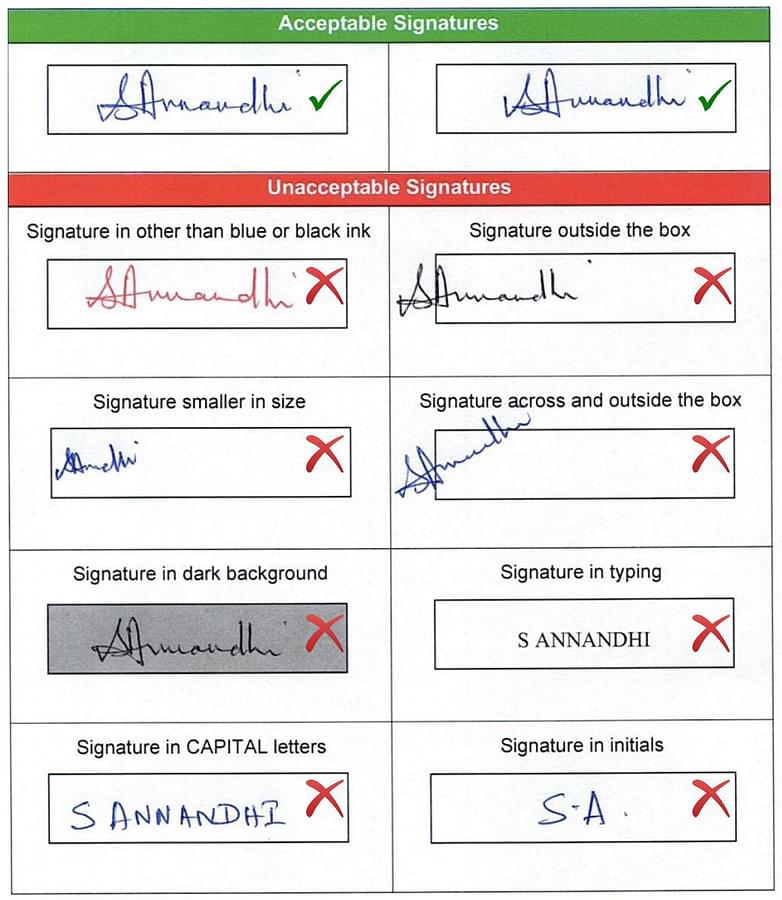
GATE Signature Specifications
Particulars | Size | Other Specifications | Format |
|---|---|---|---|
Signature in running handwriting | 5 kb-200 kb | Area of signature must cover 70-80% of the image. Pixels Range from 80×280 – 160×560 Sign with black or dark blue colour ink only. | In JPEG / JPG format |
Also Read
List of Supporting Documents for GATE
Other than uploading the photograph and signature, candidates must keep the following documents handy before initiating the process for GATE Registration. All the supporting documents mentioned below need to be uploaded while filling the online application form.
Photo ID
You have to upload the PDF file of any one of the following valid photo identity.
Valid IDs are Aadhaar- UID, Passport, PAN Card, Voter ID, College ID, Employee ID, and Driving License.
For international candidates, only a valid Passport / Government issued ID / College ID / Employee ID will be accepted as the recognized identification document.
If you do not have any of these as your identity proof then please obtain any one of them before filling the application.
Category (SC/ ST) Certificate
Candidates who belong to SC or ST category have to upload a valid documentary proof to get the concession in the application fee. A certificate issued by the authorized officials will be valid.
OBC-NCL and EWS candidates are not required to upload any category certificate while filling the online application form.
Person with Disability (PwD) Certificate
Person with Disability (PwD) candidates should attach a recently obtained PwD certificate issued by the competent authority.
The benefit would be given to those who have a minimum 40% impairment irrespective of the type of disability.
Certificate of Dyslexia
Dyslexic candidates should attach a proper dyslexic certificate issued by any authorized Dyslexia Association.
The scribe will be provided by the GATE authorities.
GATE Specification of Documents to be Uploaded Online
Here, in the table below some features about the important documents are mentioned.
Documents Required | Details | Format |
|---|---|---|
Photo ID Proof | UID, Passport, PAN Card, Voter ID, College ID, Employee ID, and Driving License | PDF Format |
Category Certificate wherever applicable | SC/ST | |
PwD Certificate wherever applicable | PWD candidate more than 40% of disability | |
Certificate of Dyslexia | Dyslexic candidates |
Note: No certificate for candidates appearing in GATE 2022 from OBC-NCL and EWS category is required.
How to Edit Images for GATE Application Form?
Candidates do not require to edit scanned images that may decrease the quality of that images. For the registration process, uploading low-quality images will not be acceptable. There are a few ways by which candidates can edit those images as per the required specifications of GATE exam.
Images can be cropped, edited, compressed by available online tools viz.
Pisaca,
Free Online Photo Editor,
Photo Pea,
Luna Pic,
Cam Scanner,
MS Paint etc.
How to edit GATE 2026 Image through Picasa?
Open the image on your PC
Download Picasa
Go to Crop → Add Aspect Custom Ratio → Add the Dimensions for Width & Height
Make the changes
Save it for uploading
Important Instructions for GATE 2026 Photo-size & Signature Guidelines
The signature on the photograph must be done in presence of the invigilator.
Candidates must bring additional copies of passport-size photographs, as used during GATE Registration.
The Photograph should not have a cap or goggles. Spectacles are allowed if being used regularly.
Applications without clear photographs are liable to be rejected.
For Signature, upload your signature in the appropriate box given in the form in running handwriting.
Writing full name in the box in capital letters will NOT be accepted as the signature. Doing so can lead to the cancellation of the application form.