
Registration
Full pageThe IPMAT Exam Application Form 2027 is expected to be released in late January or early February 2027 with the registration process conducted entirely in online mode by the participating IIMs.
Registration for IPMAT 2027 will take place through different online registration websites for IIM Indore and IIM Rohtak.
Candidates must register using a valid email ID and mobile number, complete personal and academic details and upload a photograph and signature.
The application fee is expected to be ₹4,130 for General / OBC category candidates for IIM Indore and ₹4,937 for IIM Rohtak.
Candidates can submit the fee through debit card, credit card, net banking or UPI after which the application form can be submitted and downloaded.
IIM Rohtak is expected to provide a short application correction window allowing candidates to edit selected fields after the registration deadline.
Candidates should review every detail before final submission, as category, identity details and other key fields may not be editable during the correction process.
Candidates are advised to complete the registration before the last date and keep copy of application form for admit card download and future admission stages.
Related Links:
Key Summary
IPMAT 2027 applications are expected to require OTP verification using the registered email ID and mobile number.
Candidates should upload documents only in the prescribed size and format to avoid application related issues.
The IPMAT 2027 correction window is expected to remain open for 3–5 days after the application deadline.
Name, date of birth, category, email ID and mobile number are generally not editable during the correction window.
Candidates should save the Application Number, password and confirmation page for admit card download and future admission stages.
IPMAT Exam Application Form 2027 Important Dates (Expected)
Event | IPMAT Indore 2027 (Expected) | IPMAT Rohtak 2027 (Expected) |
|---|---|---|
Official Notification Release | Late January – Early February 2027 | Late January – Early February 2027 |
Application Form Release | First week of February 2027 | First week of February 2027 |
Last Date to Submit Application | Mid to Late March 2027 | First week of April 2027 |
Application Correction Window | Late March 2027 | Mid-April 2027 |
Admit Card Release | Third / Fourth week of April 2027 | Late April – First week of May 2027 |
Exam Date | First week of May 2027 | Second week of May 2027 |
Note: All dates are tentative and based on previous year trends. Official dates will be announced on the respective IIM websites (iimidr.ac.in for Indore and iimrohtak.ac.in for Rohtak). Candidates should regularly check the official portals for updates.
IPMAT Exam 2027 Eligibility Criteria
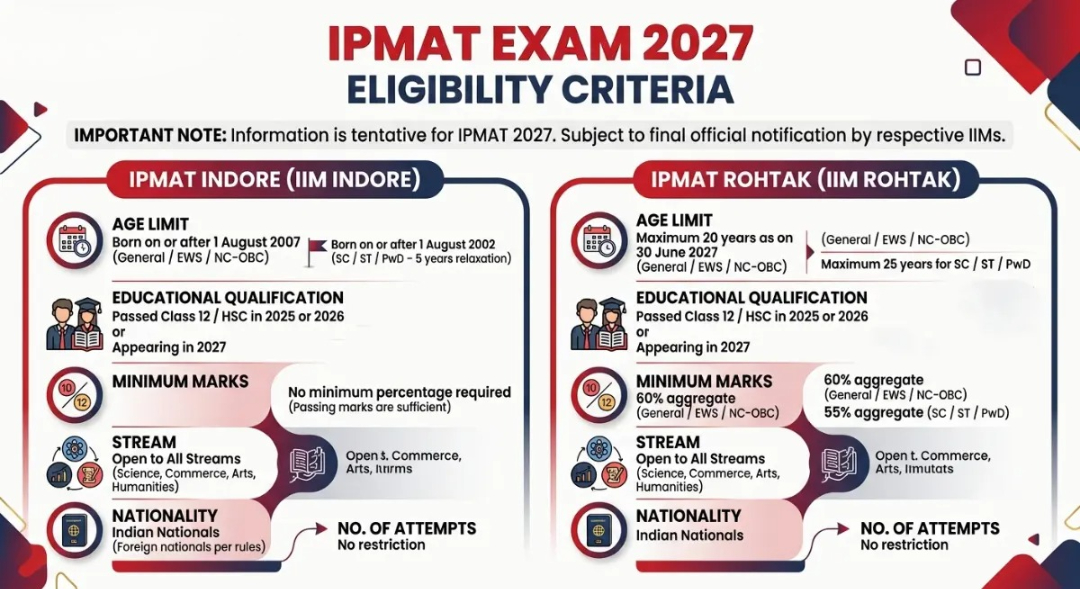
Candidates appearing for Class 12 in 2027 can apply for IPMAT Exam 2027, subject to fulfilling the prescribed eligibility conditions at the time of admission.
The eligibility criteria for IPMAT Exam 2027 would be finalized after the release of the official notification on respective IIM websites.
Criteria | IPMAT Indore (IIM Indore) | IPMAT Rohtak (IIM Rohtak) |
|---|---|---|
Age Limit |
|
|
Educational Qualification | Passed Class 12 / HSC or equivalent in 2025, 2026 or appearing in 2027 | Passed Class 12 / HSC or equivalent in 2025, 2026 or appearing in 2027 |
Minimum Marks in Class 10 & 12 | No minimum percentage required (only passing marks needed in recent years) | 60% aggregate (General / EWS / NC-OBC)55% aggregate (SC / ST / PwD) |
Stream | Open to all streams (Science, Commerce, Arts, Humanities) | Open to all streams (Science, Commerce, Arts, Humanities) |
Nationality | Indian nationals (Foreign nationals as per institute rules) | Indian nationals |
Number of Attempts | No restriction | No restriction |
Also Check: IPMAT 2026 Question Paper (Available), Download Answer Key with Solutions PDF
Documents Required for IPMAT Exam Application Form 2027
Keep scanned copies of all required documents ready in the prescribed size and format before starting the IPMAT Exam 2027 application.
Upload clear and readable documents as blurred or incorrect files may affect the IPMAT Exam 2027 application.
Category and PwD certificates should be valid on the date of IPMAT Exam 2027 application submission.
The official IPMAT 2027 information brochure will specify the required document size, format and upload guidelines.
Document | Format / Specifications | Mandatory For | Remarks |
|---|---|---|---|
Recent Passport-size Photograph | PG/JPEG, 10–200 KB, clear front-facing photo | All candidates | White/light background preferred |
Signature | JPG/JPEG, 10–100 KB, in black ink on white paper | All candidates | Must match the signature on ID proof |
Class 10 Marksheet / Certificate | PDF or JPG (as specified) | All candidates | For date of birth verification |
Class 12 Marksheet / Certificate | PDF or JPG | Candidates who have passed | Appearing candidates can upload later or leave blank if allowed |
Category Certificate | PDF (SC / ST / NC-OBC / EWS) | Reserved category candidates | Must be valid and issued by competent authority |
PwD Certificate | PwD candidates | Issued by authorized medical board | |
Valid Photo ID Proof | PDF / JPG (Aadhaar, Passport, Voter ID, etc.) | All candidates (sometimes) | For identity verification |
How to Fill IPMAT Exam Application Form 2027
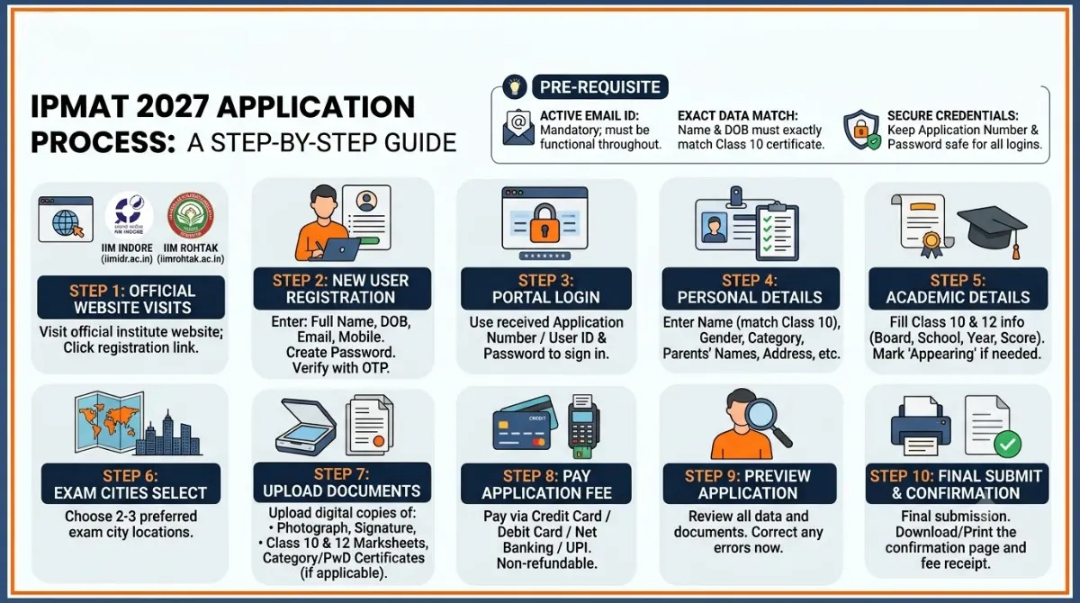
Candidates should use an active email ID while filling the IPMAT 2027 application form and the name and date of birth should exactly match the Class 10 certificate.
Keep the IPMAT 2027 Application Number and Password secure as they will be required for future logins and admission purposes.
Steps | Description |
|---|---|
Step 1 | Visit the Official WebsiteGo to iimidr.ac.in (for IPMAT Indore) or iimrohtak.ac.in (for IPMAT Rohtak) and click on the IPM / IPMAT 2027 Admission or Registration link |
Step 2 | New User RegistrationEnter basic details – Full Name, Date of Birth, Email ID, Mobile Number, and create a password. Verify via OTP sent on email/mobile |
Step 3 | Login to the PortalUse the Application Number / User ID and Password received on email/SMS to log in |
Step 4 | Fill Personal DetailsEnter Full Name (exactly as on Class 10 marksheet), Gender, Category, Father’s & Mother’s Name, Nationality, Address, and contact details |
Step 5 | Fill Academic DetailsEnter Class 10 and Class 12 details (Board, School Name, Year of Passing, Percentage/CGPA). Appearing candidates should select “Appearing” for Class 12 |
Step 6 | Select Exam CitiesChoose preferred exam cities from the available list (usually 2–3 preferences) |
Step 7 | Upload DocumentsUpload scanned copies of Photograph, Signature, Class 10 Marksheet, Class 12 Marksheet (if available), Category Certificate, and PwD Certificate (if applicable) in the prescribed format and size |
Step 8 | Pay Application FeePay the fee online using Credit Card / Debit Card / Net Banking / UPI. Fee is non-refundable |
Step 9 | Preview the Application FormCarefully review all entered details and uploaded documents. Correct any mistakes before final submission |
Step 10 | Final Submit & Download ConfirmationSubmit the form and download/print the confirmation page along with the payment receipt for future reference |
Also Check: IPMAT Exam Pattern 2026: 90 Questions, 360 Marks, Marking Scheme and Sectional Weightage
IPMAT Exam Application Fee 2027
The IPMAT Exam 2027 application fee is expected to be non-refundable after successful payment.
The expected fee is based on previous admission cycles and may include GST wherever applicable.
Candidates can pay the IPMAT Exam 2027 application fee through Credit Card, Debit Card, Net Banking or UPI.
The final IPMAT Exam 2027 application fee will be announced with the official notification on the respective IIM websites.
Candidates should verify the applicable fee on the official application portal before completing the payment.
Category | IPMAT Indore (IIM Indore) | IPMAT Rohtak (IIM Rohtak) |
|---|---|---|
General / EWS / NC-OBC | ₹4,130 | ₹4,937 |
SC / ST / PwD | ₹2,065 | ₹4,937 |
Source: IIM Indore Official/ IIM Rohtak Official
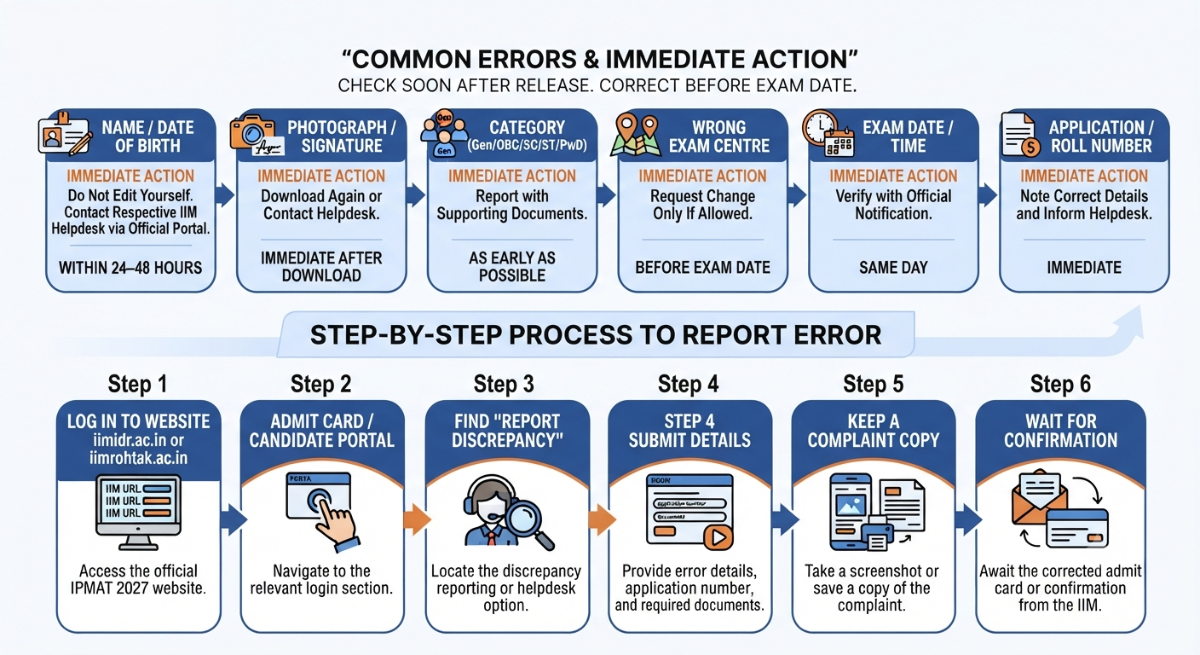
IPMAT Exam Application Form Correction 2027
The IPMAT 2027 application correction facility will be available only during the officially announced correction window.
Candidates should verify all details carefully before submitting the IPMAT 2027 application form and no further changes will be allowed after correction window closes.
Particulars | IPMAT Indore (IIM Indore) | IPMAT Rohtak (IIM Rohtak) |
|---|---|---|
Correction Window Opens | After application deadline (Late March 2027) | After application deadline (Mid-April 2027) |
Correction Window Duration | Usually 3–5 days | Usually 3–5 days |
How to Correct | Login to the candidate portal using Application Number & Password → Edit allowed fields → Re-submit | Login to the candidate portal using Application Number & Password → Edit allowed fields → Re-submit |
Fields that can usually be edited | Photograph, Signature, Address, Exam City Preference, Academic details (limited) | Photograph, Signature, Address, Exam City Preference, Academic details (limited) |
Fields that usually cannot be edited | Name, Date of Birth, Category, Email ID, Mobile Number | Name, Date of Birth, Category, Email ID, Mobile Number |
Additional Fee for Correction | Generally No extra fee | Generally No extra fee |
Official Mode | Online only (through candidate login) | Online only (through candidate login) |
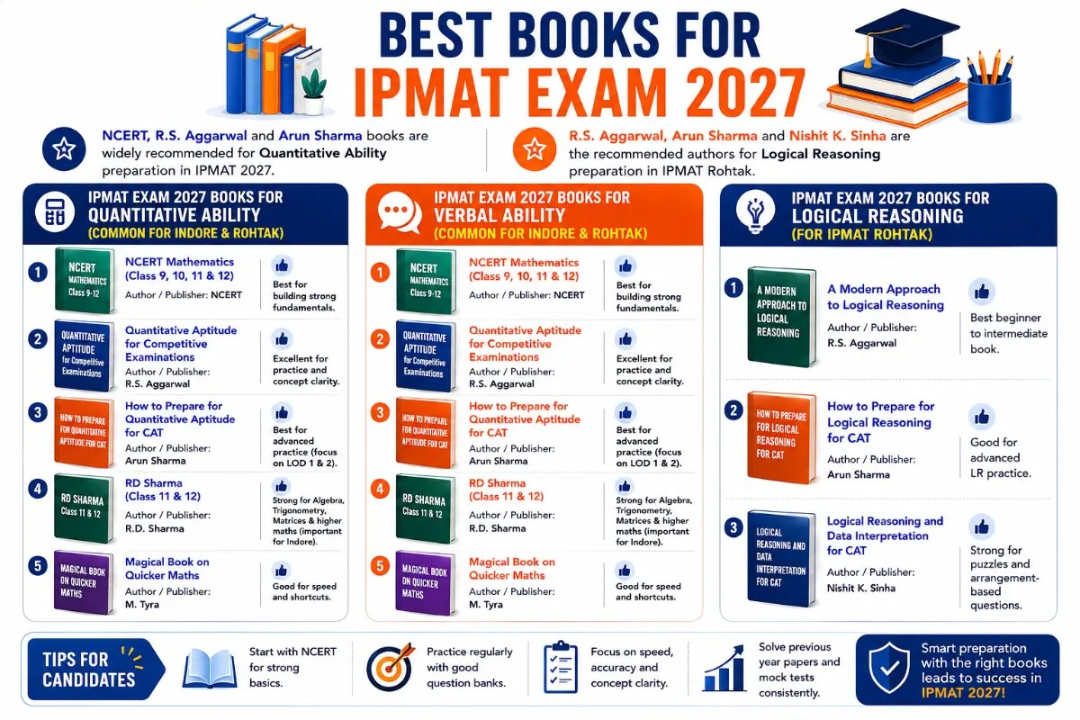
Also Check: Best Books for IPMAT Preparation, Check Important study material here
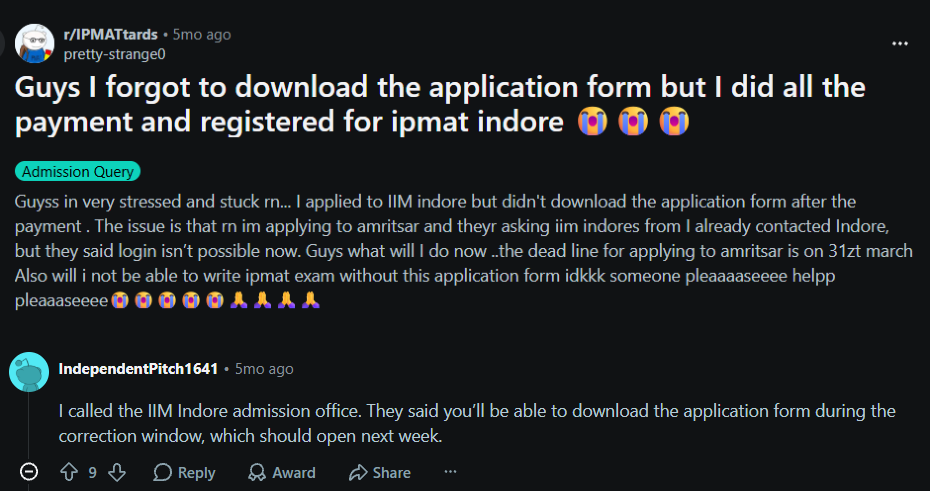
According to a Reddit discussion, candidates asked whether not downloading the IPMAT application form would affect the admission process. The discussion indicated that the application form can be downloaded during the application correction window, even if it was not saved after registration.
Source: Reddit
Common Reasons for Rejection of IPMAT Exam Application Form 2027
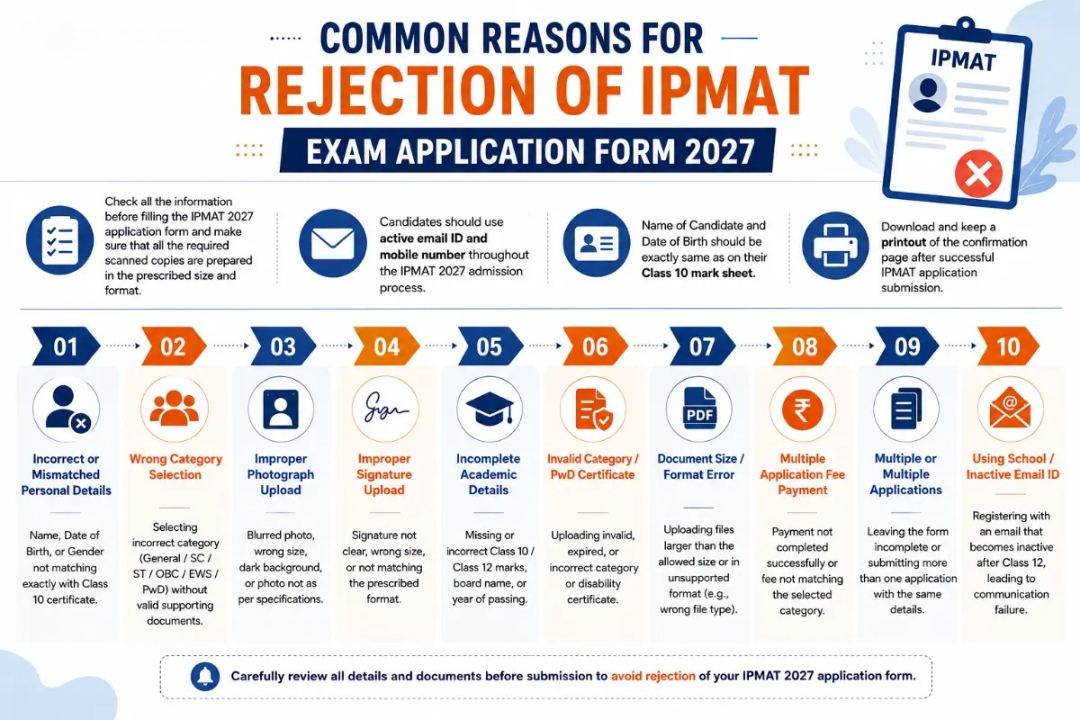
Check all the information before filling the IPMAT 2027 application form and make sure that all the required scanned copies are prepared in the prescribed size and format.
Candidates should use active email ID and mobile number throughout the IPMAT 2027 admission process.
Name of Candidate and Date of Birth should be exactly same as on their Class 10 mark sheet.
Download and keep a printout of the confirmation page after successful IPMAT application submission.
Reason for Rejection | Details / Explanation |
|---|---|
Incorrect or Mismatched Personal Details | Name, Date of Birth, or Gender not matching exactly with Class 10 certificate |
Wrong Category Selection | Selecting incorrect category (General / SC / ST / OBC / EWS / PwD) without valid supporting documents |
Improper Photograph Upload | Blurred photo, wrong size, dark background, or photo not as per specifications |
Improper Signature Upload | Signature not clear, wrong size, or not matching the prescribed format |
Incomplete Academic Details | Missing or incorrect Class 10 / Class 12 marks, board name, or year of passing |
Invalid Category / PwD Certificate | Uploading invalid, expired, or incorrect category or disability certificate |
Document Size / Format Error | Uploading files larger than the allowed size or in unsupported format (e.g., wrong file type) |
Multiple Application Fee Payment | Payment not completed successfully or fee not matching the selected category |
Multiple or Multiple Applications | Leaving the form incomplete or submitting more than one application with the same details |
Using School / Inactive Email ID | Registering with an email that becomes inactive after Class 12, leading to communication failure |
Also Check: IPMAT Exam Preparation Tips for Class 12 Students